
vCloud Availablity: Configure Replicator: Part 3
While deploying appliance you may face this error so login into the appliance and run this command and choose number 6 to configure IP manually. […]
While deploying appliance you may face this error so login into the appliance and run this command and choose number 6 to configure IP manually. […]

VMware vCloud Availability is a Disaster Recovery-as-a-Service (DRaaS) solution. In multi-tenant clouds, vCloud Availability provides asynchronous replications, failover, and migrations for vApps or virtual machines. vCloud Availability is available through […]

vCloud Director rpm in centos. First install wget yum install -y wget yum install java-1.7.0-openjdk yum install -y libICE yum install -y libSM yum install […]
1 – Upgrade the existing instance of vCloud Director 2 – Deploy the new vCloud Director 9.7 Appliance (Here) 3 – Migrate the external SQL […]
After deploying vCloud Director you can see below screen. Last page is summary and you can click finish.
Login into vCD cell and run below commands: [root@localhost ~]# service vmware-vcd stop [root@localhost ~]# cd /opt/vmware/vcloud-director/bin/ [root@localhost bin]# ./vmware-vcd-cell maintenance [root@localhost bin]# ./cell-management-tool -u […]
If you know the vCloud Director database username and password, you can use the recover-password command of the cell management tool to recover the vCloud […]
The migration workflow includes four major stages. Creating the new vCloud Director server group by deploying one or more instances of the vCloud Director 9.7 […]
First download the OVF file from vmware site. Now go to vCenter server and select deploy ovf option and provide the path of vCloud OVF. […]
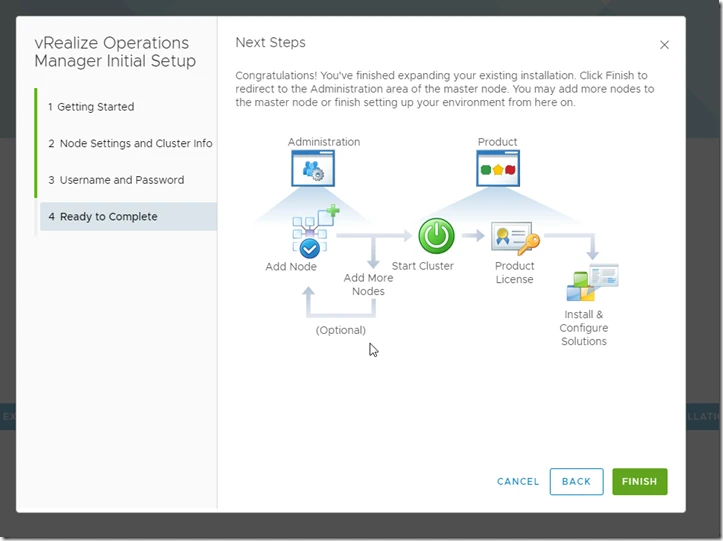
Download the OVA file from vmware 1. upload it in your vCenter server. 2. Now click on “I accept all license agreements” 3. Select as […]
Copyright © 2020 | WordPress Theme by MH Themes