Now what are all components of vSphere Replication:
Fundamentally, vSphere Replication is a handful of virtual appliances that allow the vSphere kernel to identify and replicate changed blocks from a source site to a target site. All of these virtual appliance components are bundled into a single standard OVA virtual appliance called the vSphere Replication Appliance. From where you can download this vSphere OVF
Contents of the vSphere Replication Appliance
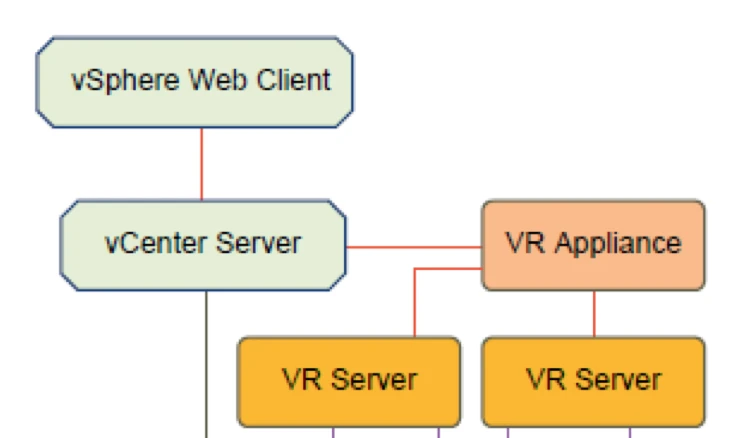
The vSphere Replication appliance provides all the components that vSphere Replication requires.
- A plug-in to the vSphere Web Client that provides a user interface for vSphere Replication.
- An embedded database that stores replication configuration and management information.
- A vSphere Replication management server:
- Configures the vSphere Replication server.
- Enables, manages, and monitors replications.
- Authenticates users and checks their permissions to perform vSphere Replication operations.
- A vSphere Replication server that provides the core of the vSphere Replication infrastructure.
The vSphere Replication appliance provides a virtual appliance management interface (VAMI) that you can use to reconfigure the appliance after deployment, if necessary. For example, you can use the VAMI to change the appliance security settings, change the network settings, or configure an external database etc.
Before Replication Start you have to Connect Source and Target Sites
These steps begin with an administrator deploying the vSphere Replication Appliance from the OVF file. After the administrator has deployed the components,
it is a matter of pairing a source virtual machine with a destination virtual machine. Lastly, configuration of an individual virtual machine for protection tells vSphere Replication to start replicating its changes, and where to put those changes at the recovery location. This configuration necessitates the definition of a Recovery Point Object (RPO), a target folder, and a target datastore, host, cluster, or resource pool.
Before you replicate virtual machines between two sites, you must connect the sites. If the sites use different SSO, you must provide authentication details for the target site, including IP or FQDN, user and password information. When connecting sites, users at both sites must have VRM remote.Manage VRM privilege. When you connect sites that are part of the same SSO, you need to select the target site only without providing authentication details, as you are already logged in. After connecting the sites, you can monitor the connectivity state between them at Target Sites tab.

