After upgrading NSX Manager 6.3.2 facing issue with NSX manager and EAM, VIB is continuously failing.
“Problem with ESXi host preparation and specifically the error ‘Dependencies of the VIB which is updating the ESX image cannot be satisfied by the host”.
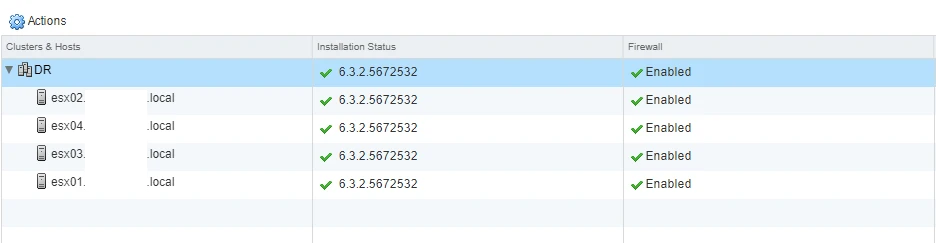
Now at this point all the Hosts are in ready state.
After rebooting NSX Manager and Deleting VUM database still not working
what is inside in ESXi logs showing error > /var/log/esxupdate.log
===========================================================================
2017-09-04T12:21:51Z esxupdate: 75636: vmware.runcommand: INFO: runcommand called with: args = ‘localcli system visorfs ramdisk list | grep /vibtransaction && localcli system visorfs ramdisk remove -t /tmp/vibtransaction’, outfile = ‘None’, returnoutput = ‘True’, timeout = ‘0.0’.
2017-09-04T12:21:51Z esxupdate: 75636: Transaction: DEBUG: Populating VIB list from all VIBs in metadata https://vc01.domain.local:443/eam/vib?id=54fbc544-436e-4e06-800d-3e2a95448d92; depots:
2017-09-04T12:21:51Z esxupdate: 75636: downloader: DEBUG: Downloading https://vc01.domain.local:443/eam/vib?id=54fbc544-436e-4e06-800d-3e2a95448d92 to /tmp/tmpgxbeofzh…
2017-09-04T12:21:51Z esxupdate: 75636: Metadata.pyc: INFO: Unrecognized file vendor-index.xml in Metadata file
2017-09-04T12:21:51Z esxupdate: 75636: imageprofile: INFO: Adding VIB VMware_locker_tools-light_6.2.6-0 -4463934 to ImageProfile (Updated) ESXi-6.5.0-20170702001-standard
2017-09-04T12:21:51Z esxupdate: 75636: imageprofile: INFO: Adding VIB VMware_bootbank_esx-vsip_6.2.6-0 -4977495 to ImageProfile (Updated) ESXi-6.5.0-20170702001-standard
2017-09-04T12:21:51Z esxupdate: 75636: imageprofile: INFO: Adding VIB VMware_bootbank_esx-vxlan_6.5.0-0.0.4463934 to ImageProfile (Updated) ESXi-6.5.0-20170702001-standard
2017-09-04T12:21:51Z esxupdate: 75636: vmware.runcommand: INFO: runcommand called with: args = ‘[‘/bin/localcli’, ‘system’, ‘maintenanceMode’, ‘get’]’, outfile = ‘None’, returnoutput = ‘True’, timeout = ‘0.0’.
2017-09-04T12:21:52Z esxupdate: 75636: HostInfo: INFO: localcli system returned status (0) Output: Enabled Error:
2017-09-04T12:21:52Z esxupdate: 75636: BootBankInstaller.pyc: INFO: Unrecognized value “title=Loading VMware ESXi” in boot.cfg
===========================================================================
I found nothing,it’s just blocking the VIB to be install on Host. After this i started troubleshooting further and start checking logs and error in vCenter and NSX Manager logs.
Thanks to Conor Scolard he found that NSX manager is trying to install old VIB as you can see in logs.
After upgrading NSX manager 6.3.2 it should be “6.5.0-0.0.4463934″
===========================================================================
2017-09-04T12:21:51Z esxupdate: 75636: Transaction: DEBUG: Populating VIB list from all VIBs in metadata https://vc01.domain.local:443/eam/vib?id=54fbc544-436e-4e06-800d-3e2a95448d92; depots:
2017-09-04T12:21:51Z esxupdate: 75636: downloader: DEBUG: Downloading https://vc01.domain.local:443/eam/vib?id=54fbc544-436e-4e06-800d-3e2a95448d92 to /tmp/tmpgxbeofzh…
2017-09-04T12:21:51Z esxupdate: 75636: Metadata.pyc: INFO: Unrecognized file vendor-index.xml in Metadata file
2017-09-04T12:21:51Z esxupdate: 75636: imageprofile: INFO: Adding VIB VMware_locker_tools-light_6.5.0-0.23.5969300 to ImageProfile (Updated) ESXi-6.5.0-20170702001-standard
2017-09-04T12:21:51Z esxupdate: 75636: imageprofile: INFO: Adding VIB VMware_bootbank_esx-vsip_6.5.0-0.0.4463934 to ImageProfile (Updated) ESXi-6.5.0-20170702001-standard
2017-09-04T12:21:51Z esxupdate: 75636: imageprofile: INFO: Adding VIB VMware_bootbank_esx-vxlan_6.5.0-0.0.4463934 to ImageProfile (Updated) ESXi-6.5.0-20170702001-standard
===========================================================================
Tried to open EAM Mob >> https://vcenterIP/eam/mob, it’s not working then “rebooted vCenter” and after that this start working.

As you can see here we have older version of VIB.(NSX Manager is on 6.3.2 version)

Under NSX Component Installation on Hosts > Clusters & Hosts is known as “Agency” and this mean Agency is corrupted.

===========================================================================
Now only option is to Delete Agency and it will automatically create new Agency and pick the Latest VIB drivers.
This is Easy when you are not using
1. VXLAN
2. NSX Firewall
But before that how to identify that Agency is corrupted.
Open SSH for NSX manager.
1. type enable and provide password.
===========================================================================
[email protected]’s password:
nsx.domain..local> en
Password:
===========================================================================
2. After this if you are working with VMware then tech support guy will type their secret password to enable “Engineering Mode”
nsx.domain..local# st e
Engineering Mode: The authorized NSX Manager system administrator is requesting a shell which is able to perform lower level unix commands/diagnostics and make changes to the appliance. VMware asks that you do so only in conjunction with a support call to prevent breaking your virtual infrastructure. Please enter the shell diagnostics string before proceeding.Type Exit to return to the NSX shell. Type y to continue: y
Password: this is VMware password
su: Authentication failure
nsx.domain..local# st e
Engineering Mode: The authorized NSX Manager system administrator is requesting a shell which is able to perform lower level unix commands/diagnostics and make changes to the appliance. VMware asks that you do so only in conjunction with a support call to prevent breaking your virtual infrastructure. Please enter the shell diagnostics string before proceeding.Type Exit to return to the NSX shell. Type y to continue: y
Password:
[root@nsx ~]# cd /home/secureall/secureall/logs/
[root@nsx /home/secureall/secureall/logs]# less vsm.log
[root@nsx /home/secureall/secureall/logs]# psql -U secureall
psql.bin (9.3.15 (VMware Postgres 9.3.15.0-4760484 release))
Type “help” for help.
Cannot read termcap database;
using dumb terminal settings.
===========================================================================
3. After this run below command
secureall=# select * from deployment_unit;




by using these commands you can check if there is any issue with NSX Manager database or not.
===========================================================================
Now Solution time:
1. First open https://vcenter/eam/mob
2. Highlighted in Yellow is Agency

3. Click on this and after that click on “DestroyAgency”.


4. Click on Invoke Method
5. Just follow the same path and check the VIB version and you will see this time it’s updated with newer version.

6. Now go to NSX Manager View and this time you will see there is no status it’s blank, that mean we can install latest version.

7. Click on Action Gear icon and install the agent.