With vSphere Replication, you can configure replication of a virtual machine from a source site to a target site, monitor and manage the status of the replication, and recover the virtual machine at the target site. When you configure a virtual machine for replication, the vSphere Replication agent sends changed blocks in the virtual machine disks from the source site to the target site, where they are applied to the copy of the virtual machine. This process occurs independently of the storage layer. vSphere Replication performs an initial full synchronization of the source virtual machine and its replica copy. You can use replication seeds to reduce the amount of time and bandwidth required for the initial replication. During replication configuration, you can set a recovery point objective (RPO) and enable retention of instances from multiple points in time (MPIT). As administrator, you can monitor and manage the status of the replication. You can view information for incoming and outgoing replications, source and target site status, replication issues, and for warnings and errors. When you manually recover a virtual machine, vSphere Replication creates a copy of the virtual machine connected to the replica disk, but does not connect any of the virtual network cards to port groups. You can review the recovery and status of the replica virtual machine and attach it to the networks. You can recover virtual machines at different points in time, such as the last known consistent state. vSphere Replication presents the retained instances as ordinary virtual machine snapshots to which you can revert the virtual machine. vSphere Replication stores replication configuration data in its embedded database. You can also configure vSphere Replication to use an external database. You can replicate a virtual machine between two sites. vSphere Replication is installed on both source and target sites. Only one vSphere Replication appliance is deployed on each vCenter Server. You can deploy additional vSphere Replication Servers.
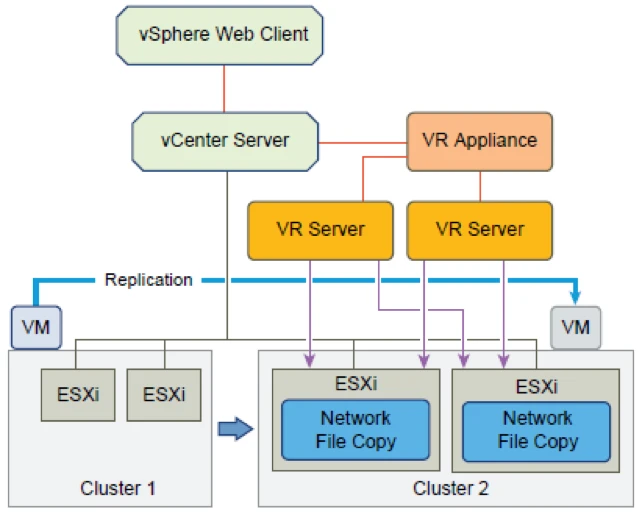
Replication In a Single vCenter Server
The most basic architecture for vSphere Replication is protecting a virtual machine within a datacenter with a single vCenter Server. The administrator deploys a single vSphere Replication Appliance to act as both the replication manager and also the recipient and distributor of hanged blocks.
The administrator then configures a virtual machine and one or more of its VMDK files to be replicated, giving the local vSphere Replication Appliance as the target, and selecting a different datastore for the replica of the virtual machine.
The vSphere Replication Agent on the appropriate vSphere 5.1 or 5.5 host that holds the running virtual machine then starts tracking changes to disk as they are being written, and in accordance with the configured RPO sends the changed blocks to the vSphere Replication Appliance. The vSphere Replication Appliance passes the changed block bundle through NFC to an ESXi host to write the blocks to the replica VMDK.
This scenario might fit a local campus scenario, with a single cluster spanning two floors of a building where recoverability is within a proximal datacenter. If a floor loses power and the primary hosts and disks are unreachable, the administrator might point to the replica VMDK within vSphere Replication and choose to recover it.
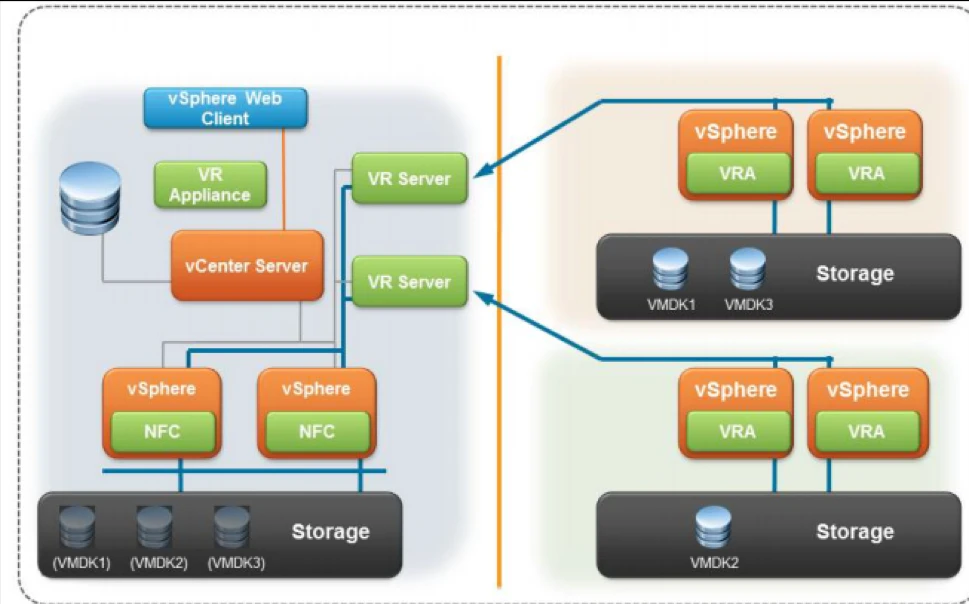
#Remote Offices Replicating with a Single VC
Another common scenario for vSphere Replication is protecting virtual machines in a Remote Office or Branch Office scenario. In this model, hosts at remote sites are not managed by distributed vCenter Server instances, but from a central “head office” data center. A single vCenter Server instance manages both local vSphere instances and remote clusters or hosts. Virtual machines from multiple remote sites must be replicated to the central office in this scenario.
At the remote sites, as long as the hosts are vSphere 5.1 or 5.5, no change must be implemented. vSphere 5.1 and 5.5 have the necessary vSphere Replication built into the kernel.
At the head office data center, at least one vSphere Replication Appliance must be deployed to manage the replication of all the virtual machines (both remote and local targets).
This single appliance will usually be sufficient to handle the incoming replications, but sometimes administrators will want to isolate replication traffic by source, or will need to scale up the number of recipient servers to handle more incoming replications. In that case, administrators can deploy more vSphere Replication servers (not the full vSphere Replication Appliance – there is only one per vCenter) to handle isolating the incoming replication traffic or to adjust for scale. Each additional vSphere Replication Server can be used as a dedicated target for one or more remote sites.
The vSphere Replication Server is the same as the vSphere Replication Appliance. Both are deployed in the same way. But if only being used as a vSphere Replication Server, the appliance is simply not paired with a vCenter Server. Within the main datacenter, the vSphere Replication servers pass the incoming replication data to the recovery cluster through Network File Copy for committing to local replica copies of the remote virtual machines.
Fan-out Approach
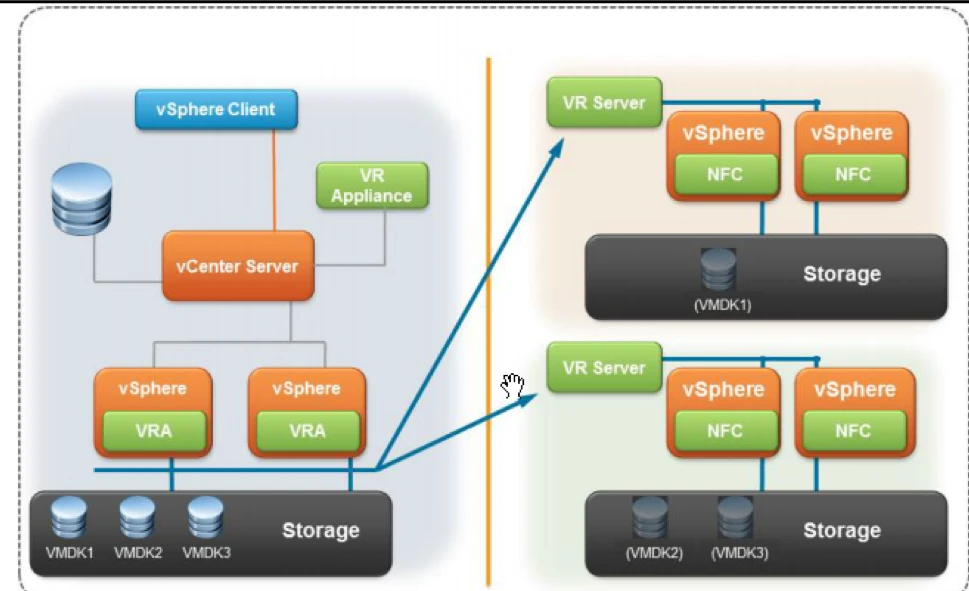
Another model is to have a central main data center replicating to multiple remote sites, to offer “fan-out” protection. In this model, a single vSphere Replication appliance is deployed at the main data center as the remote offices are still managed from a central vCenter Server. At each remote office, however, a vSphere Replication Server appliance is deployed to act as a recipient of changed blocks and to ensure that NFC disk writes are done locally to the recovery site rather than being sent across a WAN connection.
The vSphere Replication Agents on the central data center track changed blocks and distribute them through the vSphere host’s management network to the vSphere Replication Server defined as the destination for each individual virtual machine.
Note that a virtual machine can be replicated only to a single destination. A virtual machine cannot be replicated to multiple remote locations at one time. If, however, the primary data center disappears, the virtual machine that is recovered at the second site can now be configured to be replicated to a third site. This replication must be done manually, as vSphere Replication has no automation or programmatic interface.

