Identifying Fibre Channel, iSCSI, and NFS storage issues on ESX/ESXi hosts
- No targets from an array can be seen by:
- All of the ESX/ESXi hosts
- All of the ESX/ESXi hosts on a specific connection or LUN
- One ESX/ESXi host
- Targets on the storage array are visible, but one or more LUNs are not
- LUN not visible
- LUN cannot connect
- Connectivity issues to the storage array
- ESX/ESXi host initiators are not logging into the array
- The share cannot be mounted by the ESX/ESXi host
- The share is mounted, but nothing can be written to it
- You see one or more of the following errors:
- Unknown inaccessible
- SCSI: 4506: Cannot find a path to device vmhbax:x:x in a good state
- WARNING: LVM: 4844: vmhbaH:T:L:P detected as a snapshot device. Disallowing access to the LUN since resignaturing is turned off.
- Date esx vmkernel: Time cpu3: : 5637: status SCSI LUN is in snapshot state, rstatus 0xc0de00 for vmhbax:x:x. residual R 999, CR 8-, ER3
- Date esx vmkernel: Time cpu3: world ID SCSI 6624: Device vmhbax:x:x. is a deactivated snapshot
Purpose
This article helps you identify problems related with the storage subsystem of ESX/ESXi.
Resolution
Troubleshooting ESX host storage issues begins with identifying how far reaching (the scope) the problem is. In many cases, a detected problem may be misidentified until the scope has been ascertained.
To identify the scope of the problem:
- Verify that the storage device cannot be seen by any or a subset of the ESX cluster. If so, select the appropriate storage technology:
- For Fibre channel, see Troubleshooting fibre channel storage connectivity (1003680).
- For iSCSI connected by hardware initiator, see Troubleshooting iSCSI array connectivity (1003681).
- For NFS, see Troubleshooting connectivity issues to an NFS data store (1003967).
- Verify that no more than a single ESX host cannot see the shared storage. If so, select the appropriate storage technology:
- For iSCSI connected by hardware initiator, see Troubleshooting ESX and ESXi connectivity to iSCSI arrays using hardware initiators (1003951).
- For iSCSI connected by software initiator, see Troubleshooting ESX and ESXi connectivity to iSCSI arrays using software initiators (1003952).
- For NFS, see Troubleshooting connectivity issues to an NFS datastore (1003967).
- Verify that the LUN is presented and available. For more information, see Troubleshooting LUN connectivity issues (1003955).
- Verify that the ESX host cannot see the datastore:
- For Fibre channel or iSCSI, see Troubleshooting VMFS-3 datastore issues (1003964).
- For NFS, see Troubleshooting connectivity issues to an NFS datastore (1003967).
Related Information
Troubleshooting flow chart:
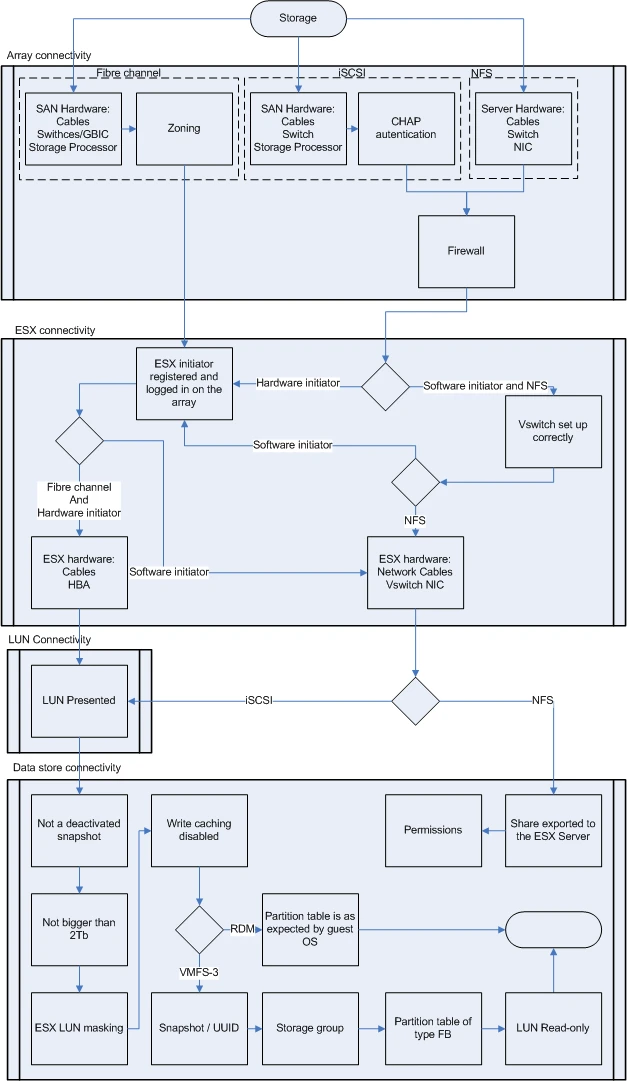
Reference:
https://kb.vmware.com/s/article/1003659?lang=en_US&queryTerm=esxi+storage+issue
