 by
by A VMware Virtual SAN (VSAN) stretched cluster is a storage solution that spans two physical sites, allowing you to create a shared datastore that is accessible to both sites. This type of configuration can be useful in scenarios where you need to ensure high availability and data protection across multiple locations.
In a VSAN stretched cluster, you have a minimum of four ESXi host servers, two at each site. These host servers are connected to local storage devices, which are used to create a shared datastore that is mirrored across both sites. This ensures that the data is always available, even if one of the sites experiences an outage.
One of the benefits of a VSAN stretched cluster is that it provides a high level of fault tolerance and data protection. If one of the sites experiences an outage, the other site can continue to access the shared datastore and keep the virtual machines running. Additionally, the stretched cluster configuration allows you to perform maintenance or upgrades on one site without impacting the availability of the shared datastore.
However, there are also some considerations to keep in mind when using a VSAN stretched cluster. One of the primary considerations is the distance between the two sites. The distance between the sites should be relatively short (typically within 300km) to ensure low latency and efficient data replication. Additionally, you need to have a reliable and high-bandwidth network connection between the sites to ensure that the shared datastore is accessible and performs well.
In summary, a VSAN stretched cluster is a useful option for environments that need to ensure high availability and data protection across multiple locations. However, it is important to carefully consider the distance between the sites and the network connectivity to ensure that the stretched cluster configuration meets your needs.
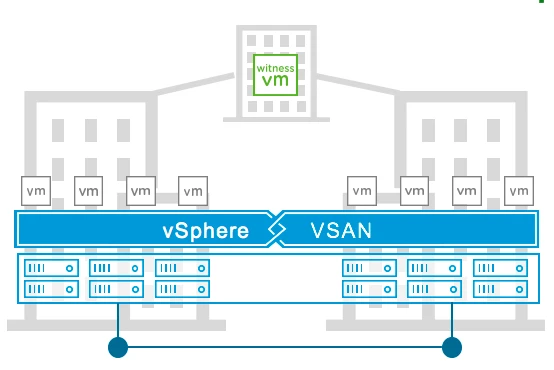
vSphere & vSAN
VMware vSAN 6.1 introduced several features including All-Flash and 2 Node Cluster functionality. There are no limitations on the edition of vSphere used for vSAN.
vSphere Distributed Resource Scheduler (DRS)
For vSAN, vSphere DRS is very desirable. DRS will provide initial placement assistance, load balance the environment when there’s an imbalance, and will also automatically migrate virtual machines to their correct site in accordance with VM/Host affinity rules. It can also help with migrating virtual machines back to a node after recovers after a failure based on overall utilization. Otherwise, the administrator will have to manually carry out these tasks.
vSphere DRS is only available in vSphere Enterprise+ or higher editions.
vSphere Enterprise for ROBO, introduced in vSphere 6.7 U1 provides a DRS-Lite functionality. While the full capabilities of proactive workload migration are not included in vSphere Enterprise for ROBO, it does include the ability to automatically migrate VMs off of hosts when placing hosts in maintenance mode, such as when performing upgrades.
vSphere Availability (HA)
As in any environment, vSphere HA is very desirable for use with vSAN. HA will restart virtual machines when a host has failed. Additionally, when a vSAN node has failed, vSphere HA will restart virtual machines on an alternate host. When a vSAN node becomes isolated, vSAN will power off virtual machines, but will not restart them. vSphere HA is used to restart these virtual machines on hosts that have not been isolated.
Some additional settings are required for vSphere HA to work properly when used with vSAN. These settings are covered in detail later in this guide.
Hybrid and All-Flash Support
VMware vSAN Stretched Clusters are supported on both Hybrid configurations (hosts with local storage comprised of both magnetic disks for capacity and flash devices for cache) and All-Flash configurations (hosts with local storage made up of flash devices for capacity and flash devices for cache).
On-disk Formats
VMware supports vSAN Stretched Clusters require a minimum v2 On-Disk format.
The v1 On-Disk format is based on VMFS and is the original On-Disk format used for vSAN.
The v2 On-Disk format is the version which comes by default with vSAN version 6.x. Customers that upgraded from the original vSAN 5.5 to vSAN 6.0 may not have upgraded the On-disk format for v1 to v2, and are thus still using v1.
In vSAN 6.2 clusters, the v3 On-Disk format allows for additional features, such as Erasure Coding, Checksum, and Deduplication & Compression.
In vSAN 6.6/6.7 clusters, the v3 On-Disk may be used with the exception of when Per-Site Policies or Encryption are used. To use Per-Site Policies or Encryption the v5 On-Disk format is required.
VMware recommends upgrading to the latest On-Disk format for improved performance, scalability, and feature capabilities.
vSAN Witness Host
Both physical ESXi hosts and vSAN Witness Appliances (nested ESXi) are supported as a Stretched Cluster Witness Host.
VMware provides a vSAN Witness Appliance for those customers who do not wish to use a physical host for this role. The vSAN Witness Appliance must run on an ESXi 5.5* or higher host. This can include an ESXi Free licensed host, a vSphere licensed (ESXi) host, or a host residing in OVH (formerly vCloud Air), a vCloud Air Network (VCAN) partner, or any hosted ESXi installation.
Witness host(s) or Appliances cannot be shared between multiple vSAN Stretched Clusters.
*When vSAN 6.7, the physical host the vSAN Witness Appliance is running on, must also meet the CPU requirements of vSphere 6.7. Supported CPU information can be found in the vSphere 6.7 Release Notes: https://docs.vmware.com/en/VMware-vSphere/6.7/rn/vsphere-esxi-vcenter-server-67-release-notes.html
Feature Support Statements
The following are limitations on a vSAN Stretched Cluster implementation:
- In a vSAN Stretched Clusters, there are only 3 Fault Domains. These are typically referred to as the Preferred, Secondary, and Witness Fault Domains. Standard vSAN configurations can be comprised of up to 32 Fault Domains.
- Pre-vSAN 6.6, the maximum value for Number Of Failures To Tolerate in a vSAN Stretched Cluster configuration is 1. This is the limit due to the maximum number of Fault Domains being 3.
- In vSAN 6.6, Number Of Failures To Tolerate has been renamed Primary Failures To Tolerate. Local Protection has been added with Secondary Failures To Tolerate, providing additional data availability scenarios. More information can be found specific to these rules in the Per-Site Policies section.
Support statements specific to using vSAN Stretched Cluster implementations:
- SMP-FT, the new Fault Tolerant VM mechanism introduced in vSphere 6.0:
- Is not supported on Stretched Cluster vSAN deployments where the FT primary VM and secondary VM are not running in the same location.
- Is supported on Stretched Cluster vSAN deployments where the FT primary and secondary VM are running within the same location. (This can be achieved by creating a VM/Host rule for that particular VM, and setting PFTT=0 and SFTT=1 with affinity to the same location as the VM/Host rule definition.)
- Is supported when using 2 Node configurations in the same physical location. SMP-FT requires appropriate vSphere licensing. *The vSAN Witness Appliance managing a 2 Node cluster may not reside on the cluster it is providing quorum for. SMP-FT is not a feature that removes this restriction.
- The Erasure Coding feature introduced in vSAN 6.2:
- Is not supported because Stretched Cluster Configurations prior to vSAN 6.6 due to only having 3 Fault Domains.
Erasure Coding requires 4 Fault Domains for RAID5 type protection and 6 Fault Domains for RAID6 type protection. - Is supported for Local Protection within a site when using vSAN 6.6 and Per-Site Policies .
- Is not supported because Stretched Cluster Configurations prior to vSAN 6.6 due to only having 3 Fault Domains.
- The vSAN iSCSI Target Service is not supported on vSAN Stretched Clusters.
- SCSI3-PR Support for Windows Server Failover Clustering (WSFC) introduced in vSAN 6.7 Update 3:
- Is supported on vSAN Stretched Clusters using vSAN 6.7 Update 3 or higher.
- This does not take into account the failover mechanism for WSFC
- WSFC-based applications should be configured to properly failover in the event of a site failure.
- Is supported on vSAN Stretched Clusters using vSAN 6.7 Update 3 or higher.
vSAN 8 using the Express Storage Architecture (ESA)
vSAN 8 using the Express Storage Architecture (ESA) supports all stretched cluster features and enhancements available for the Stretched cluster configuration until now, except – vSAN File services. Improved uptime for Stretched clusters is supported.
New Concepts in vSAN – Stretched Clusters
A common question is how Stretched Clusters differ from Fault Domains, which is a vSAN feature that was introduced with vSAN version 6.0.
vSAN Stretched Clusters vs. Fault Domains
A common question is how stretched cluster differs from fault domains, which is a vSAN feature that was introduced with vSAN version 6.0. Fault domains enable what might be termed “rack awareness” where the components of virtual machines could be distributed across multiple hosts in multiple racks, and should a rack failure event occur, the virtual machine would continue to be available. However, these racks would typically be hosted in the same data center, and if there was a data center-wide event, fault domains would not be able to assist with virtual machines’ availability.
Stretched clusters essentially build on what fault domains did, and now provide what might be termed “data center awareness”. VMware vSAN Stretched Clusters can now provide availability for virtual machines even if a data center has a catastrophic outage.
The vSAN Witness Host
vSAN Witness Purpose
The witness host is a dedicated ESXi host, or vSAN Witness Appliance, whose purpose is to host the witness component of virtual machines objects.
The witness must have a connection to both the primary vSAN node and the backup vSAN node to join the cluster. In steady-state operations, the primary node resides in the “Preferred site”; the backup node resides in the “Secondary site”. Unless the witness host connects to both the primary and the backup nodes, it will not join the vSAN cluster.
vSAN Witness Connectivity
The vSAN Witness Host must be managed by the same vCenter Server managing the vSAN Cluster.
There must be connectivity between vCenter Server and the vSAN Witness Host in the same fashion as vCenter controlling other vSphere hosts.
The vSAN Witness Host must also have connectivity between the vSAN Witness Host and the vSAN nodes.
This is typically performed through connectivity between the vSAN Witness Host vSAN VMkernel interface and the vSAN data network.
In vSAN 6.7 a separately tagged VMkernel interface may be used instead of providing connectivity between the vSAN Witness Host and the vSAN data network.
These will be covered more thoroughly in a later section.
Updating or Upgrading the vSAN Witness Appliance
The vSAN Witness Appliance can easily be maintained/patched using vSphere Update Manager in the same fashion as traditional ESXi hosts.
It is not required to deploy a new vSAN Witness Appliance when updating or patching vSAN hosts. Normal upgrade mechanisms are supported on the vSAN Witness Appliance.
Note: When using an OEM provided vSphere ISO for upgrading vSAN hosts it is important to remember that additional OEM specific drivers or software may be included. It is important to use only a VMware provided vSphere ISO to upgrade the vSAN Witness Appliance.
Read Locality in vSAN Stretched Clusters
n traditional vSAN clusters, a virtual machine’s read operations are distributed across all replica copies of the data in the cluster. In the case of a policy setting of NumberOfFailuresToTolerate =1, which results in two copies of the data, 50% of the reads will come from replica1 and 50% will come from replica2. In the case of a policy setting of NumberOfFailuresToTolerate =2 in non-stretched vSAN clusters, results in three copies of the data, 33% of the reads will come from replica1, 33% of the reads will come from replica2 and 33% will come from replica3.
In a vSAN Stretched Cluster, we wish to avoid increased latency caused by reading across the intersite link. To ensure that 100% of reads occur in the site the VM resides on, the read locality mechanism was introduced. Read locality overrides the NumberOfFailuresToTolerate=1 policy’s behavior to distribute reads across the components.
DOM, the Distributed Object Manager in vSAN, takes care of this. DOM is responsible for the creation of virtual machine storage objects in the vSAN cluster. It is also responsible for providing distributed data access paths to these objects. There is a single DOM owner per object. There are 3 roles within DOM; Client, Owner and Component Manager. The DOM Owner coordinates access to the object, including reads, locking as well as object configuration and reconfiguration. All objects changes and writes also go through the owner. The DOM owner of an object will now take into account which fault domain the owner runs in a vSAN Stretched Cluster configuration, and will read from the replica that is in the same domain.
There is now another consideration with this read locality, one must avoid unnecessary vMotion operations of the virtual machine between sites. Since the read cache blocks are stored on one site, if the VM moves around freely and ends up on the remote site, the cache will be cold on that site after the move. (Note that this only applies to hybrid configurations, as all-flash configurations do not have an explicit read cache.) Now there will be sub-optimal performance until the cache is warm again. To avoid this situation, soft affinity rules are used to keep the VM local to the same site/fault domain where possible. The steps to configure such rules will be shown in detail in the vSphere DRS section of this guide.
VMware vSAN 6.2 introduced Client Cache, a mechanism that allocates 0.4% of host memory, up to 1GB, as an additional read cache tier. Virtual machines leverage the Client Cache of the host they are running on. Client Cache is not associated with Stretched Cluster read locality, and runs independently.
Witness Traffic Separation (WTS)
By default, when using vSAN Stretched Clusters, the Witness VMkernel interface tagged for vSAN traffic must have connectivity with each vSAN data node’s VMkernel interface tagged with vSAN traffic.
Witness Traffic Separation is supported on Stretched Cluster configurations as of vSAN 6.7, an alternate VMkernel interface can be designated to carry traffic destined for the Witness rather than the vSAN tagged VMkernel interface. This feature allows for more flexible network configurations by allowing for separate networks for node-to-node and node-to-witness traffic.
Mixed MTU (Jumbo Frames)
In addition to WTS, mixed MTU sizes (e.g. 9000 for vSAN data and 1500 for vSAN Witness traffic) is supported as of vSAN 6.7 U1.
Per Site Policies
Prior to vSAN 6.6
Up until vSAN 6.6, protection of objects in a Stretched Cluster configuration was comprised of one copy of data at each site and a witness component residing on the Witness host.
This configuration provided protection from a single failure in any 1 of the 3 sites, due to each site being configured as a Fault Domain. Using existing policies, 3 Fault Domains allow for a maximum number of a single failure.
During normal operation, this was not a significant issue. In the event of a device or node failure, additional traffic could potentially traverse the inter-site link for operations such as servicing VM reads and writes, as well as repairing the absent or degraded replica.
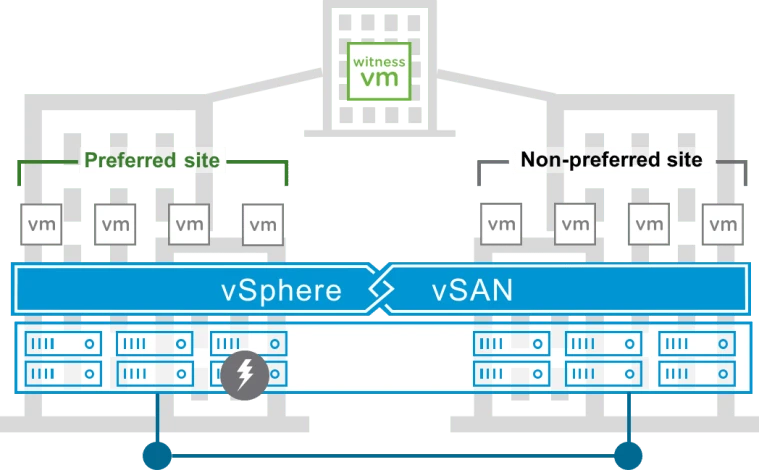
Stretched Cluster bandwidth sizing is sized based on the number of writes a cluster requires. Capacity for resync operations is taken into account with 25% of the available bandwidth allocated. Reads, however, are not taken into account normally in sizing.
Impact during when an object is absent or degraded
Availability scenarios differ depending on the type of failure or lack of availability.
If a host goes offline, or a capacity device is unmounted, the components will not be replaced until either the 60-minute threshold is reached. This is configurable, but VMware recommends not to adjust this setting. During the timeframe that the object is absent, if the object is present on the alternate site from the virtual machine, reads from the object will cause additional overhead while traversing the inter-site link. Resycs will not occur until after 60 minutes. After the 60-minute threshold occurs, reads and resyncs will traverse the inter-site link until the object is replaced on the site it is absent from.
When a device fails due to a hardware error, data is immediately resynched to repair the object data. Like an absent object after the 60-minute threshold, a degraded event will cause immediate reads and resyncs across the inter-site link.
The impact can be insignificant if there are few items that need to be replaced or if the inter-site link is oversized. The impact can be significant if there are many items to be replaced or the inter-site link is already at full utilization.
Also, consider that an additional failure until the object is repaired will cause the object(s) to become inaccessible. This is because up until vSAN 6.6, Stretched Clusters only protect from a single failure.
New Policy Rules in vSAN 6.6
In vSAN 6.6 a few rule changes were introduced. Use of these rules provides additional protection or flexibility for Stretched Cluster scenarios.
- Failures to Tolerate is renamed to Primary Failures To Tolerate, this is the only rule that received a name change. It still behaves the same, and in a Stretched Cluster, the only possible values are 0 or 1.
- Failure Tolerance Method has not changed, but when used in conjunction with another rule, it could change object placement behavior.
- Secondary Failures To Tolerate is a new rule that specifically changes the local protection behavior of objects in each site of a vSAN 6.6 Stretched Cluster.
- The final new rule is Affinity. This rule is only applicable when Primary Failures To Tolerate is 0. When Primary Failures To Tolerate is 0, this rule provides the administrator the ability to choose which site the vSAN object should reside on, either the Preferred or Secondary Fault Domain.
The vSphere Client introduced in vSphere 6.7, presents Storage Policy creation a bit differently than the vSphere Web Client.
The updated Storage Policy Creation wizard is streamlined to present the Availability rules, with the option of enabling Advanced rules.
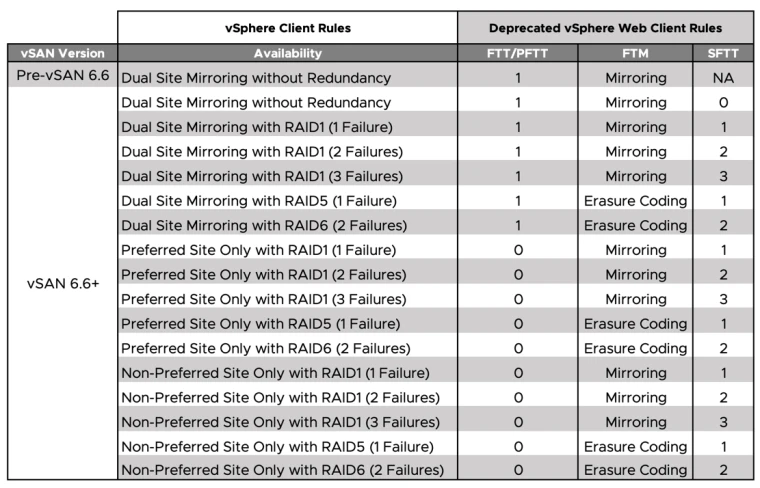
These new policy rules provide:
- Local Protection for objects on vSAN 6.6 Stretched Clusters
- Site Affinity for objects vSAN 6.6 Stretched Clusters when protection across sites is not desired.
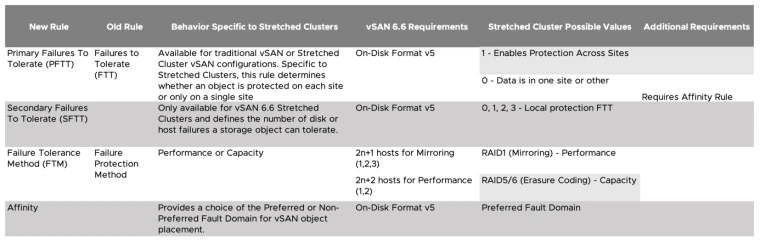
The only upgrade requirement for vSAN 6.5 customers to use the new rules in vSAN 6.6 and above, is the requirement to upgrade the On-Disk format from Version 3 to Version 5. Bandwidth requirements do not change.
Upon upgrade from a vSAN 6.5 Stretched Cluster to a vSAN 6.6 Stretched Cluster, an existing Stretched Cluster policy of FTT=1 with FTM=Mirroring will become a PFTT=1, FTM=Mirroring.
To meet the requirements of the addition of Local Protection, there is a minimum host count per site.
.webp)
*Erasure Coding requires an All-Flash vSAN Configuration
Data access behavior using the new Policy Rules
vSAN Stretched Clusters have traditionally written a copy of data to each site using a Mirroring Failure Tolerance Method. These were full writes to each site, with reads being handled locally using the Site Affinity feature. Write operations are dependent on VM Storage Policy rules in a vSAN 6.6 Stretched Cluster.
Dual Site Mirroring/Primary Failures To Tolerate behavior
- When a Primary Failures to Tolerate rule is equal to 1, writes will continue to be written in a mirrored fashion across sites.
- When a Primary Failures to Tolerate rule is equal to 0, writes will only occur in the site that is specified in the Affinity rule.
- Reads continue to occur from the site a VM resides on.
Local Protection/Secondary Failures To Tolerate behavior
- When a Secondary Failures to Tolerate rule is in place, the behavior within a site adheres to the Failure Tolerance Method rule.
- As illustrated in the above table, the number of failures to tolerate, combined with the Failure Tolerance Method, determine how many hosts are required per site to satisfy the rule requirements.
- Writes and reads occur within each site in the same fashion as they would in a traditional vSAN cluster, but per site.
- Only when data cannot be repaired locally, such as cases where the only present copies of data reside on the alternate site, will data be fetched from the alternate site.
Affinity
- The Affinity rule is only used to specify which site a vSAN object, either Preferred or Secondary, will reside on.
- It is only honored when a Primary Failures To Tolerate rule is set to 0.
- VMware recommends that virtual machines are run on the same site that their vSAN objects reside on.
- Because the Affinity rule is a Storage Policy rule, it only pertains to vSAN objects and not virtual machine placement.
- This is because read and write operations will be required to traverse the inter-site link when the virtual machine and vSAN objects do not reside in the same site.
vSAN Stretched Cluster Capacity Sizing when using Per-Site Policy Rules
Prior to Per-Site policy rules, vSAN Stretched Cluster capacity sizing was primarily based on the Mirroring Failure Tolerance Method, assuming a FTT=1.
Leave a Reply