 by
by Resource Management
Enhanced DRS Performance
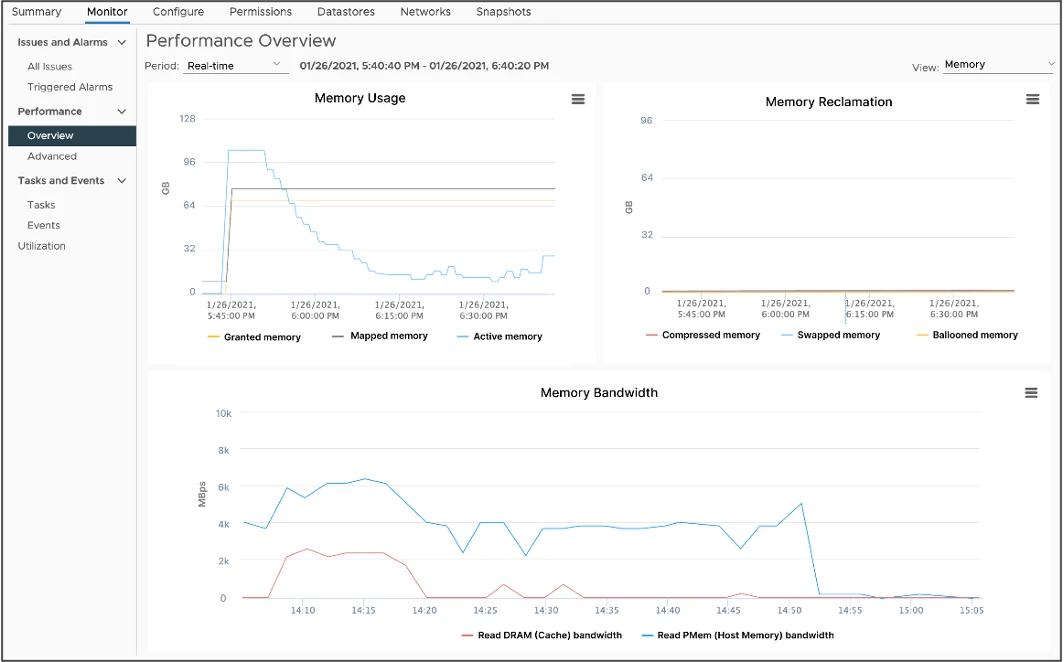
VMware has introduced a new feature with vSphere 7.0U3 called vSphere Memory Monitoring and Remediation (vMMR). vMMR helps bridge the need for monitoring by providing running statistics at both the VM (bandwidth) and Host levels (bandwidth, miss-rates). vMMR also provides default alerts and ability to configure custom alerts based on the workloads that run on VMs. vMMR collects data and provides visibility of performance statistics so you can determine if your application workload is regressed due to Memory Mode.
In vSphere 8, DRS performance can be significantly improved when PMEM is present by leveraging memory statistics, resulting in optimal placement decisions for VMs without affecting performance and resource consumption.
Monitor Energy and Carbon Emissions
vSphere Green Metrics introduces new power consumption metrics for hosts and virtual machines. These metrics allow administrators monitor the energy consumption of the vSphere infrastructure and determine, based on the energy sources used to power the data center, the energy efficiency of the vSphere infrastructure.
The three new metrics track :
- power.capacity.usageSystem: Power consumption of a host’s system activities; how much power the host is using not attributed to VMs
- power.capacity.usageSystem: Power consumption of a host’s idle activity; how much power the host is using when it’s not doing anything except being on
- power.capacity.usageVm: Power consumption of a host due to VM workloads; how much power the host is using to run VM workloads
Security & Compliance
vSphere strives to be secure out of the box. In vSphere 8, further measures are taken to make vSphere secure by default.

Prevent execution of untrusted binaries: ESXi 8.0 will turn on the execInstalledOnly option by default. This prevents the
execution of binaries that are not installed via a VIB.
TLS 1.2 only: vSphere 8 will not support TLS 1.0 and TLS 1.1. Both have previously been disabled by default in vSphere 7 and are now removed in vSphere 8.
SSH Automatic Timeout: SSH access is deactivated by default and in vSphere 8 a default timeout is introduced to prevent SSH sessions lingering.
Sandboxed Daemons: ESXi 8.0 daemons and processes run in their own sandboxed domain where only the minimum required permissions are available to the process.
Discontinuation of Trusted Platform Module (TPM) 1.2: ESXi 8.0 displays a warning during installation or upgrade if a TPM
1.2 device is present. The install or upgrade is not prevented.
This host has TPM1.2 hardware which is no longer supported. For full use of vSphere features, use TPM 2.0.
Credit: VMware.com
Leave a Reply