0

VMware Cloud on AWS Feature Walkthroughs
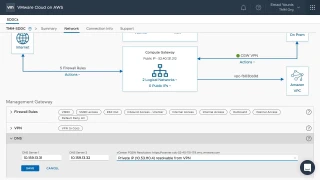
VMware Cloud on AWS Feature Walkthroughs

VMware Cloud on AWS Feature Walkthroughs

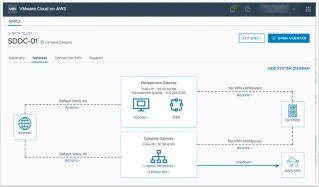
We are pleased to announce the release of a new set of feature walkthroughs for VMware Cloud on AWS. Many of you are familiar with the feature walkthroughs that VMware has created over the years for various other products, like vSphere, NSX and the vRealize Suite. The post VMware Cloud on AWS Feature Walkthroughs appeared first on VMware Cloud Community .


VMware Social Media Advocacy

0

Free ebook: Upgrading to VMware vSphere 6.5:…

Free ebook: Upgrading to VMware vSphere 6.5: vSphere
Free ebook: Upgrading to VMware vSphere 6.5:…

Continue to provide the best foundation for your business. Learn about the three phases of the upgrade to ensure a successful process overall whether you are upgrading from vSphere 5.5 or vSphere 6.0. Access this ebook to understand what steps should be taken to support and meet the needs of your organization.


VMware Social Media Advocacy

0

Onboarding to VMware Cloud on AWS

Onboarding to VMware Cloud on AWS

Onboarding to VMware Cloud on AWS

Joining the VMware Cloud on AWS service is not like deploying vCenter or other VMware products. Because VMware Cloud on AWS is a managed service operated by VMware, you need on onboard to the service and create what we call an Organization which is the key tenant construct within VMware Cloud on AWS. In the The post Onboarding to VMware Cloud on AWS appeared first on VMware Cloud Community .


VMware Social Media Advocacy

0

Road to VCAP6-NV: Objective 4.1 – Configure and…

Road to VCAP6-NV: Objective 4.1 – Configure and Manage Logical Firewall Services | Let’s v4Real
Road to VCAP6-NV: Objective 4.1 – Configure and…

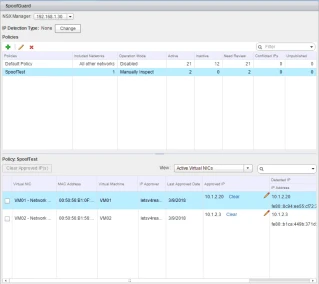
In this blog post I will cover section 4 object 4.1 of the VCAP6-NV Deploy exam. Objective 4.1 – Configure and Manage Logical Firewall Services Skills and Abilities Configure Edge and Distributed Firewall rules according to a deployment plan: Create/configure Firewall rule sections for specific departments Create/configure Identity-based firewall (IDFW) for specific users/groups Configure SpoofGuard…Read More


VMware Social Media Advocacy

0

VMware Certified Professional 6.5 – Data Center Virtualization (VCP6.5-DCV)

Outline

  • Introduction to vSphere and the Software-Defined Data Center
    • Describe the topology of a physical data center
    • Explain the vSphere virtual infrastructure
    • Define the files and components of virtual machines
    • Describe the benefits of using virtual machines
    • Explain the similarities and differences between physical architectures and virtual architectures
    • Define the purpose of ESXi
    • Define the purpose of vCenter Server
    • Explain the software-defined data center
    • Describe private, public, and hybrid clouds
  • Creating Virtual Machines
    • Introduce virtual machines, virtual machine hardware, and virtual machine files
    • Identify the files that make up a virtual machine
    • Discuss the latest virtual machine hardware and its features
    • Describe virtual machine CPU, memory, disk, and network resource usage
    • Explain the importance of VMware Tools™
    • Discuss PCI pass-through, Direct I/O, remote direct memory access, and NVMe
    • Deploy and configure virtual machines and templates
    • Identify the virtual machine disk format
  • vCenter Server
    • Introduce the vCenter Server architecture
    • Deploy and configure vCenter Server Appliance
    • Use vSphere Web Client
    • Back up and restore vCenter Server
    • Examine vCenter Server permissions and roles
    • Explain the vSphere HA architectures and features
    • Examine the new vSphere authentication proxy
    • Manage vCenter Server inventory objects and licenses
    • Access and navigate the new vSphere clients
  • Configuring and Managing Virtual Networks
    • Describe, create, and manage standard switches
    • Configure virtual switch security and load-balancing policies
    • Contrast and compare vSphere distributed switches and standard switches
    • Describe the virtual switch connection types
    • Describe the new TCP/IP stack architecture
    • Use VLANs with standard switches
  • Configuring and Managing Virtual Storage
    • Introduce storage protocols and storage device types
    • Discuss ESXi hosts using iSCSI, NFS, and Fibre Channel storage
    • Create and manage VMFS and NFS datastores
    • Describe the new features of VMFS 6.5
    • Introduce vSAN
  • Virtual Machine Management
    • Use templates and cloning to deploy new virtual machines
    • Modify and manage virtual machines
    • Clone a virtual machine
    • Upgrade virtual machine hardware to version 12
    • Remove virtual machines from the vCenter Server inventory and datastore
    • Customize a new virtual machine using customization specification files
    • Perform vSphere vMotion and vSphere Storage vMotion migrations
    • Create and manage virtual machine snapshots
    • Create, clone, and export vApps
    • Introduce the types of content libraries and how to deploy and use them
  • Resource Management and Monitoring
    • Introduce virtual CPU and memory concepts
    • Explain virtual memory reclamation techniques
    • Describe virtual machine overcommitment and resource competition
    • Configure and manage resource pools
    • Describe methods for optimizing CPU and memory usage
    • Use various tools to monitor resource usage
    • Create and use alarms to report certain conditions or events
    • Describe and deploy resource pools
    • Set reservations, limits, and shares
    • Describe expandable reservations
    • Schedule changes to resource settings
    • Create, clone, and export vApps
    • Use vCenter Server performance charts and esxtop to analyze vSphere performance
  • vSphere HA, vSphere Fault Tolerance, and Protecting Data
    • Explain the vSphere HA architecture
    • Configure and manage a vSphere HA cluster
    • Use vSphere HA advanced parameters
    • Define clusterwide restart ordering capabilities
    • Enforce infrastructural or intra-app dependencies during failover
    • Describe vSphere HA heartbeat networks and datastore heartbeats
    • Introduce vSphere Fault Tolerance
    • Enable vSphere Fault Tolerance on virtual machines
    • Support vSphere Fault Tolerance interoperability with vSAN
    • Examine enhanced consolidation of vSphere Fault Tolerance virtual machines
    • Introduce vSphere Replication
    • Use vSphere Data Protection to back up and restore data
  • vSphere DRS
    • Describe the functions and benefits of a vSphere DRS cluster
    • Configure and manage a vSphere DRS cluster
    • Work with affinity and anti-affinity rules
    • Describe the new capabilities for what-if analysis and proactive vSphere DRS
    • Highlight the evolution of vSphere DRS using predictive data from VMware vRealize® Operations Manager™
    • Perform preemptive actions to prepare for CPU or memory changes
    • Describe the vCenter Server embedded vSphere Update Manager, VMware vSphere® ESXi™ Image Builder CLI, and VMware vSphere® Auto Deploy capabilities
    • Use vSphere HA and vSphere DRS together for business continuity
  • vSphere Update Manager
    • Describe the new vSphere Update Manager architecture, components, and capabilities
    • Use vSphere Update Manager to manage ESXi, virtual machine, and vApp patching
    • Install vSphere Update Manager and the vSphere Update Manager plug-in
    • Create patch baselines
    • Use host profiles to manage host configuration compliance

Scan and remediate hosts